Managing Claude's toolbox: Skills, MCP, and Plugins
Notebook Intelligence (NBI) is an AI coding assistant and extensible AI framework for JupyterLab.
When you run Claude inside NBI, the agent rarely works with the model alone. It reaches for Skills you have written, MCP servers that expose external data and actions, and plugins that bundle commands and configuration. In NBI 5.0 these three capabilities each became their own top-level Settings tab, with a consistent admin-policy story layered on top. This post walks through what each tab manages, where the underlying configuration lives on disk, the import and marketplace workflows, and how an administrator can pin any of them on or off. Later in this series we look at the agent-aware chat sidebar and the coding-agent launchers and platform work.
Skills
A Skill is a directory holding a SKILL.md file plus any helper files it needs. Claude invokes Skills like callable plugins, so a Skill is how you teach the agent a repeatable procedure once and reuse it across sessions. Skills live under ~/.claude/skills/ at user scope or <project>/.claude/skills/ at project scope.
In earlier releases the Skills UI was tucked inside the Claude-mode settings. NBI 5.0 promotes it to a top-level tab that is visible in any mode. If Claude mode happens to be off, the tab still appears and shows a hint banner explaining that Skills apply when Claude mode is active.
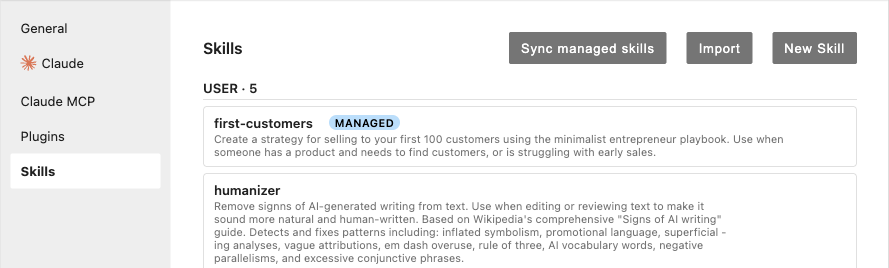
The tab supports three ways to get Skills onto disk. You can author one in place with New Skill. You can Import from GitHub by pasting a github.com/owner/repo/tree/main/skills/<name> URL: NBI fetches the tarball, validates it, and installs it. During import you can check Track upstream, which makes the Skill auto-syncable. Tracked Skills gain a per-Skill Sync button plus a panel-level “Sync tracking skills” button, so you can pull upstream changes on demand. The GitHub archive is capped at 100 MB; you can raise or lower that with NBI_SKILL_MAX_ARCHIVE_MB, where 0 disables the cap entirely.
The third path is for organizations. Point NBI_SKILLS_MANIFEST (or the skills_manifest traitlet) at one or more YAML manifests, given as comma-separated URLs and filesystem paths. NBI unions them with first-wins deduplication for URLs. A reconciler installs every Skill listed in the manifest at startup and re-checks every 24 hours. Managed Skills are read-only in the UI and carry a MANAGED badge; if a user deletes one, the reconciler restores it on its next pass. Managed and upstream-tracked are mutually exclusive: a Skill the organization owns is not also user-syncable. If you need to halt reconciliation, there is an authenticated, idempotent kill switch at POST /notebook-intelligence/skills/reconciler/stop. There is deliberately no /start companion, and the reconciler also stops itself if its policy reads force-off.
That policy is NBI_SKILLS_MANAGEMENT_POLICY. Setting it to force-off hides the tab, returns HTTP 403 from every /notebook-intelligence/skills/* route, and suppresses the managed-skills reconciler, so the feature is genuinely off rather than merely hidden.
Claude MCP Servers
The Model Context Protocol (MCP) lets Claude talk to external tools and data sources through standardized server processes. The Claude MCP Servers tab manages the user-, project-, and local-scope MCP entries that Claude Code reads from ~/.claude.json and <project>/.mcp.json. This is separate from the existing non-Claude NBI MCP tab; the two never appear at the same time, so you always see the one that matches your current mode.
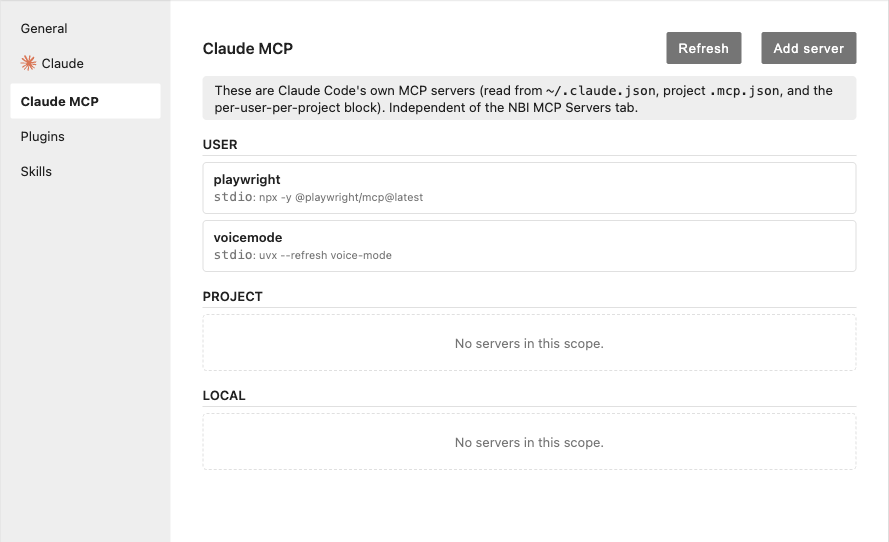
Each entry can be enabled or disabled per workspace without being removed, which is useful when a server is configured globally but you only want it active in some projects. Adding a server by hand can be tedious, so the tab also accepts a JSON paste: drop in a Claude, Cursor, or VS Code MCP config blob and NBI parses it, validates it, and pre-fills the form for you. Malformed entries are rejected on the server side, so a bad paste never quietly lands in your config file.
Administrators gate the whole tab with NBI_CLAUDE_MCP_MANAGEMENT_POLICY, which takes the same three values as the other tabs.
Claude Plugins
The Claude Plugins tab wraps the claude plugin command-line tool, giving you a UI for install, uninstall, enable, disable, and marketplace operations without dropping to a terminal. Plugins bundle commands and configuration that extend what Claude can do.
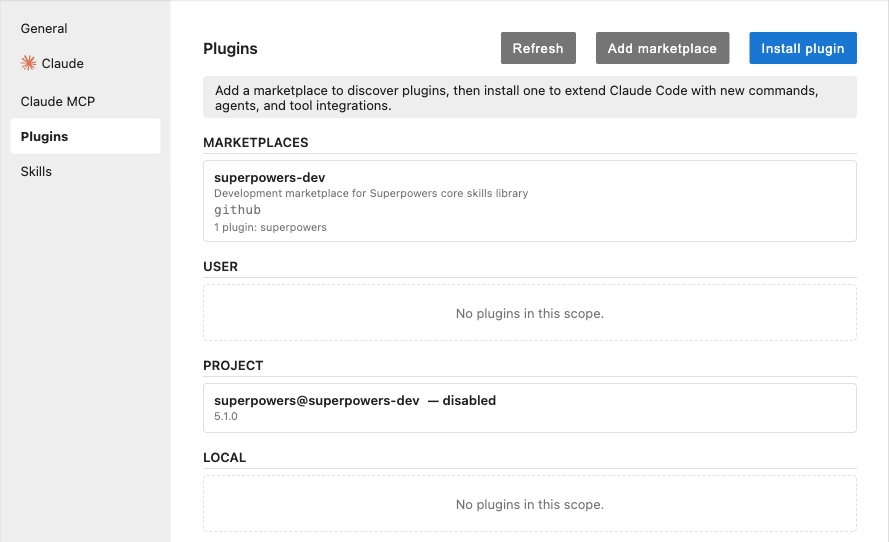
The marketplace picker browses your configured marketplaces and installs inline, showing each plugin’s source repository, version, and description so you know what you are adding before you commit. When a newer version exists upstream, the affected plugin gets a per-plugin Update button. GitHub-sourced marketplace adds reuse the standard token precedence of GITHUB_TOKEN, then GH_TOKEN, then gh auth token. Those tokens are passed through the subprocess environment, never on the command line, so they do not leak into argument lists or process listings.
Plugins carry two policies rather than one. NBI_CLAUDE_PLUGINS_MANAGEMENT_POLICY governs the tab as a whole, and NBI_ALLOW_GITHUB_PLUGIN_IMPORT separately controls whether GitHub marketplace sources are permitted. That split lets an administrator allow plugin management from trusted marketplaces while still blocking arbitrary GitHub imports.
One policy model, three tabs
The three tabs share a single admin-policy shape. Every policy accepts force-on, force-off, or user-choice. A force-* value locks the corresponding control in the UI so users cannot toggle it, while user-choice hands the decision back to the user. The policies are parsed strictly: a typo such as force_on raises an error at startup rather than silently falling back to a default, so a misconfigured deployment fails loudly instead of behaving in a way you did not intend.
Taken together, Skills, Claude MCP Servers, and Claude Plugins make the agent’s toolbox visible and manageable in one place, with consistent controls for both individual users and the administrators who deploy NBI to a team. In the next post we turn to how the chat experience itself surfaces what the agent is doing.
This is part 1 of a 3-part look at what is new since NBI 4.8. See also An agent-aware chat sidebar and Coding-agent launchers, Codex, and a hardened platform.