Coding-agent launchers, Codex, and a hardened platform
Notebook Intelligence (NBI) is an AI coding assistant and extensible AI framework for JupyterLab.
This is the final post in a three-part tour of everything that landed since NBI 4.8. The first post covered the new top-level Settings tabs for Skills, MCP, and Plugins. The second walked through the agent-aware chat sidebar. Here we step outside the sidebar entirely: launching coding agents straight from the JupyterLab launcher, a provider fix that lets Codex models work in chat, dynamic model discovery for GitHub Copilot, an end-to-end accessibility pass, and a round of platform security hardening.
Coding-agent launcher tiles
NBI is not only a chat sidebar. Many people run command-line coding agents in a terminal, and JupyterLab already has terminals built in. So the launcher now carries a “Coding Agent” section with tiles for Claude Code, opencode, Pi, GitHub Copilot CLI, and OpenAI Codex. Clicking a tile opens a Jupyter terminal and starts that agent there, which keeps your agent session next to your notebooks rather than in a separate window.
A tile appears only when its binary is found on PATH. If you have claude installed but not codex, you see the Claude Code tile and not the Codex one, so the launcher reflects what you can actually run. The screenshot below shows a machine where only Claude Code is on PATH. When a CLI lives somewhere unusual, you can point NBI at it with a path override: NBI_OPENCODE_CLI_PATH, NBI_PI_CLI_PATH, NBI_GITHUB_COPILOT_CLI_PATH, or NBI_CODEX_CLI_PATH. The Claude Code tile is no longer gated by Claude chat mode; it shows whenever claude is on PATH, independent of which chat mode you have selected.
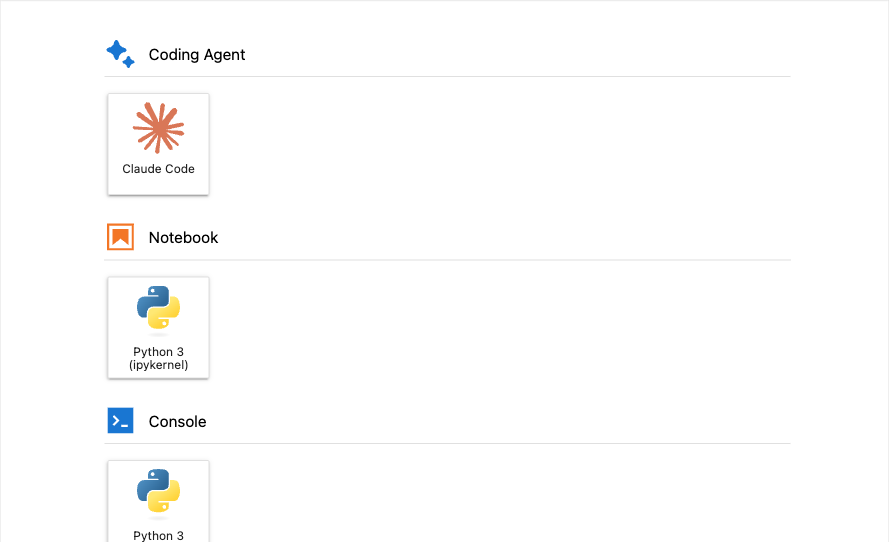
By default a tile opens a terminal at the file browser’s current directory, which is usually what you want. When it is not, you can pick where the session starts: clicking a tile (or “New Session” on the Claude resume dialog) opens a directory picker first, so the terminal lands in the folder you choose.
For shared deployments, the tiles can be governed centrally. The disabled_coding_agent_launchers traitlet takes a list of launcher identifiers (claude-code, opencode, pi, github-copilot-cli, codex) and hides those tiles. If an operator wants to disable a launcher fleet-wide but still let individual pods opt back in, they can set allow_enabling_coding_agent_launchers_with_env and then re-enable per pod through NBI_ENABLED_CODING_AGENT_LAUNCHERS.
Codex chat models over the /responses endpoint
GitHub Copilot’s Codex-family chat models, such as gpt-5.3-codex, used to fail when you picked one from the chat-model dropdown. The reason is that these models are not served by Copilot’s standard /chat/completions path at all. They are served only by Copilot’s mirror of the OpenAI Responses API, and sending a Codex model to /chat/completions returns an HTTP 400. So the model would show up as selectable but error out the moment you sent a message.
NBI 5.0.1 fixes this by choosing the endpoint per model rather than assuming /chat/completions for everything. The Copilot /models catalog describes each model with a supported_endpoints field, and NBI reads that field to decide where a given model’s requests should go. For offline sessions where the catalog is not available, it falls back to a codex substring check on the model name. When a model belongs on the Responses API, NBI translates both the request body and the streaming events into the Responses shape so the chat experience is identical to any other model. There are no new settings to configure: the endpoint dispatch is internal to the Copilot provider.
Dynamic GitHub Copilot model discovery
The list of models Copilot offers changes over time, and a hardcoded dropdown drifts out of date. NBI now queries https://api.githubcopilot.com/models on each Copilot token refresh and rebuilds the chat-model dropdown from the live response, so newly released models appear without an NBI upgrade. If that request fails transiently, NBI falls back to a built-in list rather than showing an empty dropdown, and that fallback list was itself refreshed with newer Copilot models so the offline path stays current.
Accessibility
A coding assistant should be usable without a mouse and without sight, so NBI went through an accessibility pass spanning many pull requests. The goal was end-to-end navigation by keyboard and by screen reader, audited under JupyterLab’s light, dark, and high-contrast themes so the work holds up across appearances rather than only in the default theme.
A few of the concrete changes:
- The chat-sidebar header icons are now real, keyboard-reachable buttons rather than click-only glyphs.
- The Settings tabs form an ARIA tablist with arrow-key navigation between tabs.
- The workspace, tools, and slash-command popovers are keyboard-first, and focus is restored to where you were when they close.
- Settings checkboxes carry the WAI-ARIA checkbox role and activate with the Space key.
- Streaming chat replies announce through an
aria-live="polite"region, so a screen reader follows the response as it arrives instead of going silent. - A visually hidden skip-to-input link is the sidebar’s first focusable child, so you can jump straight to the prompt.
- The animated border on the generating state pauses under
prefers-reduced-motion. - A global Ctrl/Cmd+Shift+L shortcut focuses the chat input from anywhere in Lab.
Security and platform
The 5.0.0 release also tightened several boundaries that matter when NBI runs in a shared or multi-user deployment.
File-path handling is the largest piece. The shell tool’s working_directory and the Claude UI-bridge tool paths are now sandboxed to jupyter_root, so an agent cannot operate on paths outside the Jupyter server’s root. The encrypted GitHub-token file is forced to mode 0o600 on every save, keeping it readable only by its owner. Process-environment secrets, meaning variables whose names look like API_KEY, TOKEN, or SECRET, are scrubbed from shell-tool output so they do not leak into the transcript. Anchor URIs in chat are filtered against an XSS allowlist. And Copilot WebSocket upgrades now require Jupyter authentication and pass an origin check before the connection is accepted.
One dependency change is worth calling out because it can affect downstream code. NBI replaced fastmcp with the official mcp SDK. The external behavior is unchanged, but the swap unblocked installs on Python 3.14 and picked up urllib3>=2.7.0 CVE fixes. If your own code relied on fastmcp being present transitively through NBI, you now need to declare it as your own dependency.
Wrapping up
That closes the series. Across these three posts NBI grew a manageable toolbox for Skills, MCP, and Plugins, an agent-aware chat sidebar, launcher tiles for command-line coding agents, a correct path for Codex models, live Copilot model discovery, broad accessibility, and a hardened platform underneath. To try any of it, install or upgrade NBI and check the documentation for setup details and the full set of admin policies.
This is part 3 of a 3-part look at what is new since NBI 4.8. See also Managing Claude’s toolbox: Skills, MCP, and Plugins and An agent-aware chat sidebar.